Fort Myers Home Security Prewire Before Drywall
Explore Our Services
Contact Us Today!
(239) 322-9295
During Fort Myers new home construction, the framing stage is the practical time to plan a home security prewire. That includes camera pathways, network cabling, equipment locations, spare conduit, and room for future technology. A documented security prewire plan helps coordinate the builder, electrician, and licensed low-voltage professional before rough-in.
For many projects, pre-wiring a home creates permanent pathways for outdoor cameras, Wi-Fi access points, and alarm equipment, especially where Fort Myers weather exposure matters. Wireless devices may work well for some applications, but wiring is harder to add after drywall installation. Planning cable routes during framing can support cost efficiency by reducing future wall, stucco, or ceiling repairs.
Key Takeaways
- The best time for a home security prewire is after framing and before insulation or drywall, when the builder, electrician, and low-voltage professional can coordinate pathways and equipment locations.
- Map coverage around real entry points, including doors, garages, sliders, accessible windows, side gates, soffits, and lanai areas, while respecting neighboring properties and privacy.
- Use home-run Cat6 for cameras and access points, appropriate alarm cable for sensors, and empty conduit with pull strings for future technology. Keep low-voltage wiring separated from electrical power and confirm installation requirements with qualified professionals.
- Require durable labels, cable testing, wide and close-up construction photos, surge planning, and a complete handoff file before drywall closes.
A Home Security Prewire Must Happen Before Drywall
The best window starts after framing, when door and window openings are clear, and before insulation or drywall covers the walls. Review the electrical plan, lighting plan, cabinetry layout, and exterior elevations together. A camera location can conflict with a soffit detail, a lanai fan, or a future screen enclosure if nobody catches it early.
Your builder should schedule the low-voltage rough-in, including low-voltage wiring, alongside electrical rough-in. Each trade should coordinate equipment locations, conduits, power outlets, and pathways for cameras and access points that support power over ethernet before framing is insulated and covered with drywall. Compatible devices can receive data and power over one network cable, but confirm actual power requirements for the selected equipment with the installer.
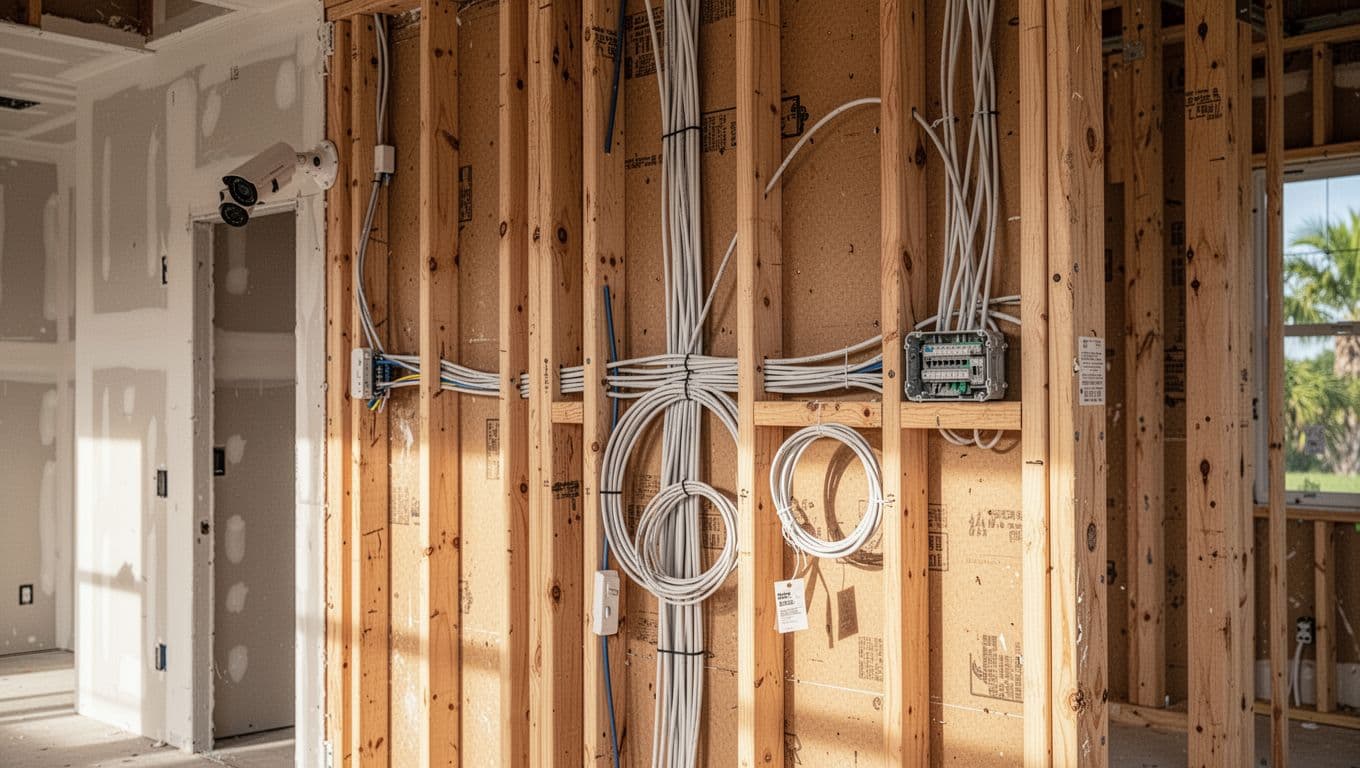
Finalize locations while the framing is open
Walk the house with the floor plan in hand. Mark the front door and doorbell, garage entry, sliders, accessible windows, utility room, exterior corners, soffits, and lanai. Note exterior camera views and likely future screen-enclosure locations.
Also decide where the network rack or structured wiring panel will live. A conditioned interior closet, laundry room, or dedicated utility area is usually better than an exposed, overheated garage. Keep the location accessible and ventilated, with room for your modem, router, PoE switch, network video recorder, and battery backup.
Require labels, photos, and testing
Every cable should have a durable label at both ends before drywall crews arrive. Labels should identify the room and device location, such as "north soffit camera" or "office access point."
Take wide photos of every framed wall, ceiling, soffit, and wiring panel. Then take closer photos that show cable routes and conduit stubs, but remember that photos don't prove correct termination. Finally, require continuity testing, termination checks, and appropriate network certification or performance testing for each run before walls close.
A cable hidden behind drywall has little value if nobody can identify its destination or verify that it works.
Map Security Coverage Around Real Entry Points
Security planning works best when it follows how people enter, exit, and move through the house. Start with the front entry, garage, lanai doors, and side gates. Then look at windows that are easy to reach from the ground or a roofline.
A security layout should also respect privacy. Avoid aiming coverage into neighboring yards or private interior spaces where it adds little value.
Cover doors, garage access, and exterior cameras
Prewire the front door for a powered video doorbell if you plan to use one. Ask the builder's electrician to confirm the selected device's voltage and transformer requirements before rough-in.
For security cameras, select angles that capture approach paths rather than only a person's face at the door. Common locations include the front entry, driveway, garage service door, lanai access points, side gates, and rear corners with a view of the yard.
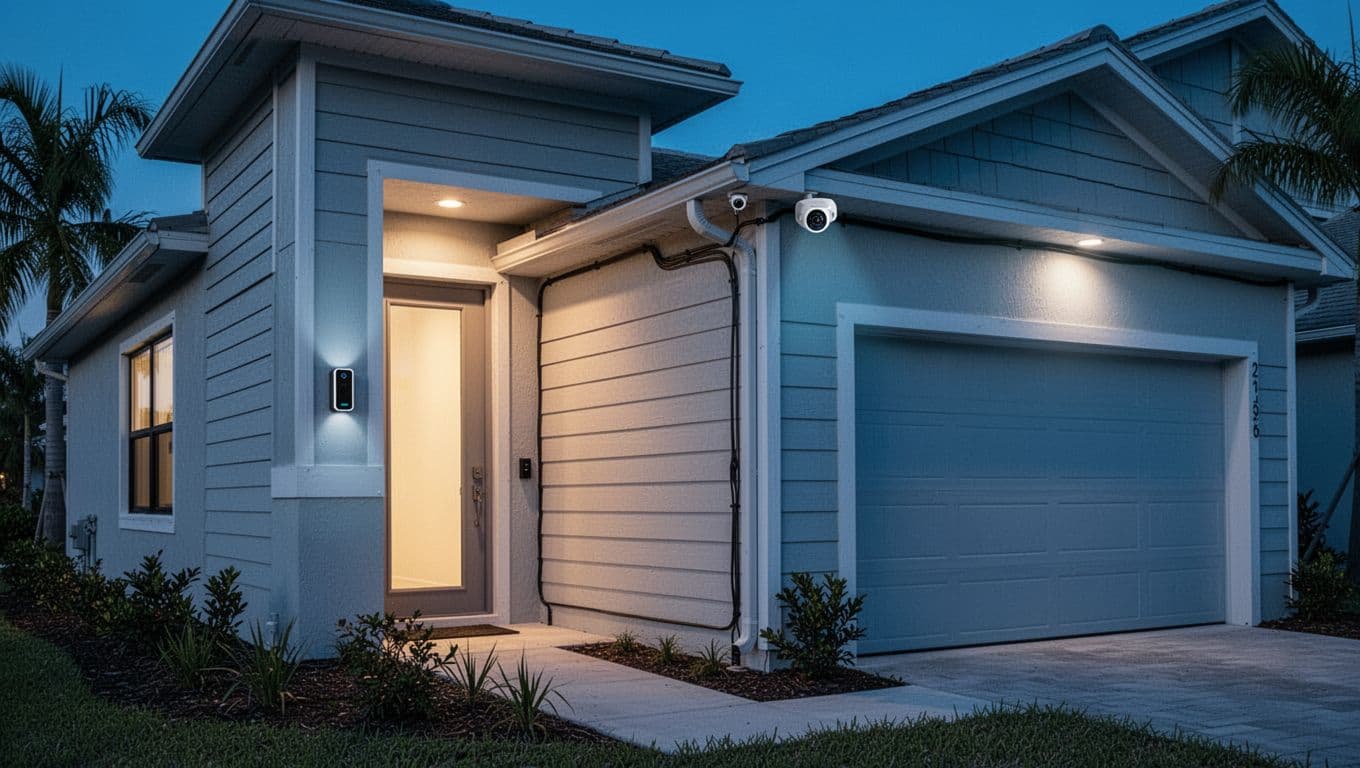
Place exterior camera cabling under protected soffits when possible, and choose mounting locations that remain serviceable. Southwest Florida exposure includes direct sun, heavy rain, wind-driven debris, and coastal salt air. These conditions influence placement, but no location guarantees equipment longevity.
Decide which sensors deserve wire runs
For homeowners who want a hardwired security system, door contacts make practical sense on frequently used exterior doors, garage access doors, and large sliders. They don't need batteries, and concealed contacts can leave finished doors and trim looking cleaner. Confirm final device and frame compatibility before installation.
Window sensors are more situational. A home with many windows can become expensive to wire, while wireless security options may simplify difficult areas. The choice depends on access, budget, battery maintenance, and your monitoring plan. Many Fort Myers homeowners choose a hybrid plan, wiring main perimeter doors and using wireless sensors at less critical windows.
Include motion detectors where they can view open travel paths. Keep them away from direct sunlight and HVAC discharge, especially in rooms with strong cooling airflow.
For smoke and water monitoring, coordinate early with the electrician and alarm professional. Life-safety devices and powered equipment have different requirements than basic low-voltage sensors. Confirm the alarm panel location and sensor wiring before framing is covered.
A legacy honeywell vista 20p may still be present in an existing home, but it isn't a recommendation for a new system. Verify compatibility, communicator support, replacement plans, and current monitoring requirements with the alarm professional.
Choose Cables That Match the Job
A security system prewire is more than a bundle of wires behind a closet wall. Cable type, pathway, termination point, and documentation determine what you can install later without opening finished walls.
For most new homes, cat6 cables are a practical starting point for cameras and network connections. They support standard Ethernet and Power over Ethernet, often called PoE. PoE can deliver data and power on one cable when the equipment, switch capacity, installation, and manufacturer specifications support it.
| Location or device | Practical prewire choice | Why it fits |
|---|---|---|
| Exterior PoE camera | Cat6 home run to network rack | Carries data and power on one cable |
| Ceiling Wi-Fi access point | Cat6 or Cat6A home run | Improves coverage without relying on mesh placement |
| Door and window contact | 22/2 cable | Supports simple hardwired alarm contacts |
| Alarm keypads or motion device | 22/4 cable | Provides extra conductors for powered security devices |
| Siren or alarm power supply | 18/2 cable | Handles low-voltage power needs |
| Future camera or gate | Empty conduit with pull string | Makes later cable pulls far easier |
These are common planning examples, not universal specifications. Confirm conductor counts and cable requirements for the selected equipment before installation.
The equipment choice may change, but well-routed Cat6 and conduit remain useful . Cat5e can support many standard network and PoE applications, while Cat6 offers more margin for a new build. Cat6A costs more and may suit long runs or homeowners planning multi-gig networking.
Run each important cable back to one location
Avoid splicing camera or network cable inside walls. Run each cable as a home run from the device location to the structured wiring panel or rack.
This layout makes troubleshooting easier. It also lets you replace one device without disturbing the rest of the system. Alarm sensor and keypad conductors should terminate at the alarm panel. Leave enough cable at both ends for clean termination, but don't coil excessive lengths inside wall cavities.
Keep low-voltage wiring separate from electrical power
Ethernet cabling, sensor wire, and camera wiring are low-voltage systems. Branch circuits and receptacles involve line-voltage electrical work, while doorbell power connections may involve both types of work.
Florida licensing and permitting requirements depend on the task and jurisdiction. Confirm current requirements with the Florida Department of Business and Professional Regulation and the applicable Fort Myers or Lee County authority. Don't assume one voltage threshold or license applies to every installation. The scope may involve a licensed electrical, low-voltage, or alarm contractor, depending on the work.
Coordinate the scope before the project starts with the builder, electrician, licensed low-voltage or alarm contractor, and professional integrator when appropriate. Confirm who will pull, terminate, label, and test each cable. Ask who will provide any required 120-volt receptacle or dedicated circuit at the equipment rack. Grounding and line-voltage work should be handled by a qualified electrical professional. Keep low-voltage pathways separated from power conductors and avoid crowded shared boxes.
Build a Strong Network Behind the Security System
A camera system is only as dependable as the home network supporting it.
Wireless security cameras can be convenient, but concrete block, metal framing, insulated walls, and large outdoor areas may weaken signals. Wired cameras avoid battery changes and reduce dependence on Wi-Fi, though any network can still experience outages.
Plan at least one wired network drop at every television wall, office, and central equipment area. Ceiling-mounted wired access points can make the home network more predictable than adding extra Wi-Fi extenders after move-in.
Protect outdoor runs from Florida surges
Outdoor power over ethernet (PoE) camera lines can carry surge energy into network gear during nearby lightning activity. Include appropriately selected surge protection at outdoor cable entry points where appropriate. The PoE switch and recorder may need protection too, based on equipment design and electrician advice.
A whole-panel surge protector belongs in the electrical discussion as well. Your electrician can advise on panel equipment, grounding, and line-voltage installation. A battery backup for the modem, router, switch, and recorder may help maintain network operation through short outages, depending on its capacity.
For related budget planning, review these Southwest Florida low-voltage prewire costs, and confirm the article's date and claims remain current. Treat the pricing as an estimate, since Fort Myers costs vary by builder package, cable count, conduit access, rack work, labor, and equipment. A basic security and network rough-in may cost a few thousand dollars, while a larger package with numerous camera points, access points, alarm wiring, conduit, and rack work can reach five figures before equipment.
Plan for smart locks without over-wiring
Most smart locks are battery-powered and don't require a dedicated low-voltage cable. Still, the surrounding door may need planning for a video doorbell, electric strike, powered hardware, or future access-control device.
Discuss these choices while the doors and frames are specified. If any lock or door hardware needs line-voltage power, a qualified electrician should coordinate that portion. Don't assume a low-voltage installer can handle every powered component.
Spend on the Runs That Are Hard to Add Later
Builder packages can be convenient, but they sometimes bundle useful cable runs with items you may never use. Ask for an itemized quote listing each location, cable type, conduit run, termination, testing, and equipment allowance.
That detail improves cost efficiency and lets you compare builder and electrician scopes with low-voltage work from a professional integrator. It also helps separate permanent infrastructure from devices you can buy later.
Prioritize permanent pathways over trendy devices
Spend first on Cat6 drops to camera points, ceiling access points, the office, and media locations. Plan pathways for a future home audio system where media wiring may be useful. Add conduit to the attic, soffits, garage, lanai, gate area, and spare exterior locations. Include pull strings in every accessible conduit.
Then decide whether hardwired alarm contacts belong at every opening. Wireless sensors can make sense when wiring is expensive, access is limited, or openings may change. A diy security system lets you buy devices later, but builder-installed camera drops, access-point wiring, and conduit are costly to recreate.
Avoid a cluttered equipment closet
A rack location needs room for cable management, ventilation, future equipment, and nearby appropriate power for the alarm panel. Keep it away from plumbing leak risks and heat, and avoid cramming it into a shallow cabinet without service access.
Ask for empty space in the enclosure and extra conduits leaving the area. A modest allowance now can support a future camera, fiber connection, generator-backed network circuit, or pool and lanai technology.
Keep the Prewire Plan Useful for Future Changes
Drywall is not the finish line, and future-proofing means preserving flexibility rather than guaranteeing every product will work. Plan smart home systems during rough-in for custom homes with a pool, outdoor kitchen, detached garage, or planned screen enclosure. Motorized shades and centralized lighting may need early coordination across architectural, electrical, low-voltage, and control plans.
A few empty conduits with pull strings cost far less during construction than opening stucco, block, or finished ceilings later. They’re often easier to install during framing than through finished surfaces. Route them where technicians can reach them, and record their ends on the final wiring map.
Create a handoff file before move-in
Ask for a digital folder with cable maps, the alarm panel, equipment models, test results, photos, warranties, and contractor contacts. Note legacy equipment, such as a honeywell vista 20p, and check compatibility before reuse. Identify spare cables and unused conduits, then keep a copy with your closing documents.
The file should identify spare cables, unused conduits, alarm monitoring provider information, account details, communicator type, and service contacts. Include the local alarm company, and confirm current monitoring, service, and permitting requirements with the provider and a licensed alarm professional.
Future owners, remodelers, and service technicians can then make informed changes without guessing behind finished walls. If your project includes broader design decisions, Southwest Florida new home construction planning works best when low-voltage, electrical, outdoor living, and structural details are coordinated early.
Frequently Asked Questions
When should a home security prewire be installed?
The ideal window is after framing, when door and window openings are visible, and before insulation or drywall covers the walls. Coordinate the low-voltage rough-in with electrical work so pathways, power, equipment locations, and future access remain clear.
What should be included in a security prewire?
A useful plan may include Cat6 home runs for cameras and Wi-Fi access points, alarm wiring for selected doors and sensors, a structured wiring panel or rack, protected camera pathways, and spare conduit with pull strings. The exact cable and conductor requirements should be confirmed for the selected equipment before installation.
Are wireless security devices enough for a new Fort Myers home?
Wireless devices can work well in some areas, but concrete block, metal framing, insulated walls, and large outdoor spaces may weaken signals. Hardwired cameras, key perimeter contacts, and wired access points reduce dependence on batteries and Wi-Fi, while wireless sensors can fill in difficult or less critical locations.
How should the prewire be documented before drywall?
Label every cable at both ends, photograph each framed wall and cable route, and require continuity, termination, and network performance testing before the walls close. Keep the final cable map, conduit locations, test results, equipment information, warranties, and contractor contacts in a digital handoff file.
Final Thoughts on Pre-Drywall Security Planning
The smartest security system prewire prioritizes infrastructure that's difficult to add later. That includes network cabling, protected camera pathways, accessible equipment space, surge planning, and spare conduit. Wireless sensors and smart devices can fill some gaps after move-in.
For Fort Myers homeowners, confirm every location, label both ends, and photograph every route before drywall closes. Test every run, record conduit ends, and obtain the handoff file before the walls close.